Kamis, 25 Desember 2008

Kitchen Furniture - Get more room in your kitchen

Kitchen Furniture design from Cancio will bring the revolution in Furniture industry. Now a days having tinny kitchen is a common problem in urban area. So you will have to use whole mind and skill to bring more and more space to be utilised.

For this Kitchen furniture requirment, Cancio bring an adjustable table. With this table easily three people can have dinner together and chat as well. If you do not want to use it than simply fold it and you will get more space in your kitchen.

Photo of adjustable table for Kitchen Furniture
Photo of adjustable table for Kitchen Furniture 2
Photo of adjustable table for Kitchen Furniture 3
Photo of adjustable table for Kitchen Furniture 4
Photo of adjustable table for Kitchen Furniture 5


Jumat, 19 Desember 2008

Artistics Shelf for your home furniture of drawing room

If you are looking for some fixed shelf for your home furniture and that should also add some artistic look to your drawing room than your search ends here. These shelf are inspired by the nature and hence this one give a refreshing look to your home and your home furniture.

Designed by Maria Yasko, this one is really some unusual experiment and hence making it more interesting.

Artistics Shelf 1
Artistics Shelf 2
Artistics Shelf 3


Selasa, 16 Desember 2008

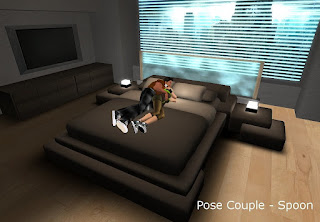
Cuddle Bed - TYPE B


:::OBF::: Cuddle Bed - TYPE B ver.1.5
- Multi-Pose ( 21 Poses for Couple and Single )
- Prims: 23 (+2 pose ball activated) Total.
- Permissions: mod / trans / NO copy
- Include:
  • Cuddle Bed - TYPE B
  • Bedside Table L / R
  • Cube Lamp L / R
  • Water Screen

HOW TO SIT AND LIE
Just click a comforter of the "Cuddle Bed" to open dialog menu. There are two options. (Couple / Single )


HOW TO ADD YOUR OWN POSE
Please refer to the enclosed ".readme" notecard.
MLP - MULTI-LOVE-POSE V1.2 - Copyright (c) 2006, by Miffy Fluffy (BSD License)

NOTE:
I do not warrant even if you add poses in a different way and it does not work correctly. I only warrant a default one.

All contents are in a comforter prim of the bed.
1. Right click the bed and choose "Edit" from pie menu.
2. Check "Edit linked parts" box.
3. Click a comforter of the bed.
4. Open "Content" tab in an edit window.


HOW TO CHANGE COLOR
- Cube Lamp and Water Screen
Click a light / screen to open dialog menu.
Cube Lamp has 11 illumination colors, Water Screen 12 colors .

- Cuddle Bed and Side Tables
These are modifiable. That mean you can change color directly from the edit window without typing any command for a script.
NOTE: Colors are affected by base texture of each parts.

Easy Instruction for a non-builder
1. Right click the object. (furniture)
2. Choose "Edit" from a pie menu.
3. Check "Edit linked Parts" box in the edit window.
4. Click the part of an object which you want to change color. ( [shift + click] to select multiple parts)
5. Click "Color" box in "Texture" tab to open a color palette window.

RGB Values in This Picture.
Comforter, Mattress and Pillows-back:
R:49 / G:45 / B:40 / H:33 / S:10 / L:17
Sheet and Pillows-near:
R:87 / G:80 / B:71 / H:34 / S:10 / L:31
Others:
R:58 / G:58 / B:58 / H:0 / S:0 / L:23

Now you can buy my products at Coders Cove in Second Life.
slurl: http://slurl.com/secondlife/Coders Cove/90/89/24/

Jumat, 05 Desember 2008

Couch - TYPE A (Color Change) - ver.2.0


:::OBF::: Couch - TYPE A (Color Change) - ver.2.0
- Channel 2 / 5-seater / Pillows Texture Change
- Prims: 13
- Permissions: mod / trans / NO copy


CLICK POSITION TO SIT
1. Bottom-left ( Book will be appeared while sitting on.)
2. Bottom-right
3. Backrest-left
4. Pillow-left Near
5. Pillow-right Near

Book will be appeared while sitting on bottom-left.


HOW TO CHANGE TEXTURE (PILLOWS)
Right click a pillow and select "Touch" from pie-menu to open a dialog menu. 5 textures available.


WHAT IS "LEGS FOR A REALIST" OBJECT FOR.
As you know, this couch is floating. This is an optinal extra for a realist who is wondering how a couch is floating. Put it under a couch if you like.

With legs - TYPE B


HOW TO CHANGE COLOR
To change the color of the furniture you must use channel 2. To change the colors from the list below you must type:

/2 color + "name of the color"

FOR EXAMPLE: /2 color black

To help you pick what colors , use the color chart provided.
And, you can also select color directly from edit tool. Because they are modifiable.

Color Chart is HERE. 140 Colors available.


This Product is in a rezzing vendor.
Now you can buy my products at Coders Cove in Second Life.
slurl: http://slurl.com/secondlife/Coders Cove/90/89/24/

Senin, 01 Desember 2008

Dining Table Set (Color Change)


:::OBF::: Dining Table Set (Color Change)
- 7 Multi-pose in Dining Chair / 1 standing pose in Dining Table.
- Permissions: mod / trans / NO copy
- Include & Prims:
  • Dining Table : 5 Prims
  • Dining Chair (4 set) : 5 Prims each.
  • Cup Candle : 2 Prims
  • Coffee : 2 Prims *( copy / NO mod / NO trans )


HOW TO CHANGE COLOR
- Tablecloth and Seat
Right click and select "Tint!" from pie-menu to open a dialog menu.
12 colors available.
And you can also change color directly from edit window because they are modifiable.


HOW TO CHANGE POSE
" Dining Chair " has 7 sitting poses. You can change pose using "PageUp or Down" key on your keyboard.
When someone (except the owner of this chair) sit on, it will send a message like this
" Use PageUp or Down key to change pose. ".


Cup Candle
Click a candle to burn / extinguish.


Coffee
Click a cup to get wearable coffee with drinking animation.


This product is in a rezzing vendor at my store.

Now you can buy and try my products at Coders Cove in Second Life.
slurl: http://slurl.com/secondlife/Coders Cove/90/89/24/

Sabtu, 29 November 2008

Guide to choose suitable Window Curtain

Perfect Window Curtain can make your home more beautiful and attractive. And imperfect match of window curtain can do the reverse as well. So below are some tips before choosing the window curtains –

Colour of Window Curtains – For this segment I think we should go as per the season nature. And as per the season we should choose the window curtain. For season I am taking three seasons importantly – Winter, Summer and Rainy


Window Curtain for winter season – For particularly this season you should select those color which can give warmth to your eyes and warmth feelings to your heart as well. Red, Maroon, Bottle Green are some suitable color example for window curtain in winter season. With this color you can also do some experiments and kept the warmth feelings alive.


Window Curtain in summer season –
This is the season when your eyes looks to relax and you want to get the feelings of cold breeze. For this you should go for light green or sea green, light blue or pink or may be combination of light blue and white can do the magic as well.


Window Curtain in Rainy Season – This time when you just want to enjoy the rains and neither hot and nor cold. So for this season you should use yellow colour with the combination of cream.


Height of Window Curtains – Basically this can be divided as per the area of room and hall.


For Big Room – You should use the lengthy and broad curtain so that your room can look filled up and there is no feeling of empty. Texture of curtain should be big so that it will suit the height and width of the room.


For Small Room –
You should try to use that much area that are essential to use curtain Any extra use of curtain can make look of your room more small and packed. For small room texture should be small.


Fabric of Window Curtain –

  • Before selecting the fabric of curtain you should consider wash as well. No doubt silky curtain look great but they are tough to wash and can give you headache as well.
  • Thickness of Window curtain should be such from which air can easily pass on and you can get the comfortable ventilation.
  • Make sure that fabric won’t shrink after first wash and color should be strong and do not fade in wash.
--

Living Room Furniture

The living room is one of the most important rooms in the house in where your family will spends their time to organizes holidays and parties, receives visitors and relaxes (Home Design). That is the reason why We need to arrange and design Our living room to put Our self comfortable at home, including choose of living room's furniture models.


You can see Our photo gallery about living room furniture items, Home furnishing styles including leather, traditional, contemporary, and modern with an expanding selection of sectionals and recliners.

Living room furniture Chair

Living room furniture Sofa

Living room furniture are including Chair, Sofa, Table, Small cabinet and Big cabinets. In order to get nice look, You have to decide first whether you want to set your living room as traditional design, modern design or romantic design. After that you can start to choose kind of living room furniture, color and models according to the living room situation.

Living room furniture Small Cabinets

Living room furniture Big Cabinets

Ensure that your living room furniture match with your existing decor and enhance the look of your living room. Whether you need an entertainment center, occasional tables, or any other living room furniture items.