Tampilkan postingan dengan label Living Room Set. Tampilkan semua postingan

Jumat, 05 September 2008

Punk Hobo's Nest


Punk Hobo's Nest
- Prims: 48 Total.
- Contents:
  • Punk Hobo Sofa - TYPE L
  • Punk Hobo Sofa - TYPE M
  • Punk Hobo Sofa - TYPE N-1
  • Punk Hobo Seat Separated
  • Punk Hobo Mattress
  • Atomic Fuel Barrel
  • Retro TV for YouTube (with TV Stand - Cargo)
  • tv screen ( Texture )
  • Manhole Cover Table
  • Hobo Rug - TYPE A

Punk Hobo Sofa - TYPE L


- 2-seater / 4 Poses
- Prims: 7
- Permissions: trans / NO mod / NO copy

Click Position to Sit
1. Bottom ( has 3 Poses )
2. Armrest-right

How to Change Pose
You can change pose using "PageUp" or "Down" key on your keyboard.
When someone (except the owner of the sofa) sit on, it will send a message like this " Use PageUp or Down key to change pose. ".


Punk Hobo Sofa - TYPE M


- 5-seater / 6 Poses
- Prims: 9
- Permissions: trans / NO mod / NO copy

Click Position to Sit
1. Bottom-right ( has 2 Poses )
2. Bottom-left
3. Backrest-right
4. Backrest-left
5. Armrest-left


Punk Hobo Sofa - TYPE N-1


- 6 + 1-seater
- Prims: 10 + 2
- Permissions: trans / NO mod / NO copy

Click Position to Sit
1. Bottom-left
2. Bottom-center
3. Bottom-separated
4. Base ( under seats )
5. Backrest-center
6. Backrest-right
7. Armrest-left


Punk Hobo Seat Separated


- 1-seater
- Prims: 2
- Permissions: trans / NO mod / NO copy


Atomic Fuel Barrel - ARMY

- 1-seater / with Ignition, Extinction and Burning sound effects.
- Prims: 5
- Permissions: trans / NO mod / NO copy

Features:
- Click the barrel to set fire / put out fire with sounds.
- Right Click the barrel and choose "Bathe!" from a pie menu to take a bath in the barrel.

If the timing between Sounds and Fire Flame were messed up.
Sometimes it might be messed up by high speed clicking. Reset scripts in the barrel.

1. Put out fire by click the barrel.
2. Say:

/99 reset

You will receive a message "Reset Complete".
( The command "/99 reset " is effective only if you the owner of the barrel.)


Punk Hobo Mattress

- 4-seater
- Prims: 6
- Permissions: trans / NO mod / NO copy

Click Position to Sit
1. Mattress
2. Book
3. Pillow-Skull
4. Pillow-Scorpion


Retro TV for YouTube with TV Stand - Crate


- Prims: 2 + 2
- Permissions: NO trans / mod / NO copy
- Contents:
- Retro TV for YouTube
- tv screen ( Texture )
- TV Stand - Crate

You can use the "Retro TV" as a land media display.
- How to Set a Land Media for "Retro TV"
1. Open "About Land" window. (World > About Land...)
2. Drag "tv screen" texture from inventory and drop into "Replace Texture:" window on Media tab.
3. Click "Retro TV" to start (stop) a media content which you choose.


ADDED BONUS FEATURE
- How to set videos carried by YouTube
1. To open YouTube site, Right Click the Retro TV ( not screen ) and Choose "Touch" from pie menu.
2. Search a video which you like.
3. Copy the URL of a media stream on YouTube.
4. In World (Second Life), Say:

/99 URL (of a media stream on YouTube)

Example:
/99 http://pl.youtube.com/watch?v=gowmZtkrV4Y
(This URL is about "PARCEL MEDIA: Play web pages, movies, & more" by Torley Linden. It will help you know about setting land media.)

:::::: IMPORTANT REMINDER ::::::
Absolutely, this feature "YouTube Player" is an added bonus. Please note that I hold no responsibilities even though it becomes out of order. Thank you.


Manhole Cover Table


- Prims: 4
- Permissions: trans / NO mod / NO copy

Feature:
- You can dace on the table with ethnic loop sound. Right click the table and choose " Dance! " from a pie menu.


Hobo Rug - TYPE A
- Prims: 1
- Permissions: trans / mod / NO copy


" Punk Hobo's Nest " is in a rezzing vendor at my store.

Now you can buy my products at Coders Cove in Second Life.
slurl: http://slurl.com/secondlife/Coders Cove/90/89/24/

Jumat, 18 Juli 2008

Living Room Set - TYPE C


Living Room Set - TYPE C

- Prims: 44 Total.
- Contents:
  • Sofa - TYPE J ( R )
  • Sofa - TYPE J ( L )
  • Sofa - TYPE K
  • Low Table - TYPE C
  • Tall Speaker ( R ) and ( L )
  • Waterdrop Lamp with Particle
  • Magazine x 2 ( Object )
  • Record ( Object )


Sofa - TYPE J ( R ) and ( L )

- 2-seater / 5 Poses
- Prims: 7
- Permissions: trans / NO mod / NO copy


- Click Position to Sit -
1. Bottom ( has 4 Poses )
2. Armrest-right ( only R ) / Backrest ( only L / not pillows )


Sofa - TYPE K

- 5-seater / 7 Poses
- Prims: 9
- Permissions: trans / NO mod / NO copy


- Click Position to Sit -
1. Bottom-left ( has 2 poses )
2. Bottom-right ( has 2 Poses )
3. Armrest-lest
4. Armrest-right
5. Backrest ( not pillows )

== How to Change Pose ==
You can change pose using "PageUp" or "Down" key on your keyboard.
When someone (except the owner of the sofa) sit on, it will send a message like this " Use PageUp or Down key to change pose. ".


Low Table - TYPE B

- 1-seater
- Prims: 6
- Permissions: trans / NO mod / NO copy

Right click the table and choose "Sit Here" from pie menu.


Tall Speaker ( R ) and ( L )

- Prims: 5 each
- Permissions: trans / NO mod / NO copy

Tall Speaker has 6 drum loop sounds of each. (12 different sounds in total.) Touch a speaker to open dialong menu.
Turn off a stereo before you leave. The sound might become a nuisance to your neighbors.


Waterdrop Lamp with Particle

- Prims: 2
- Permissions: trans / NO mod / NO copy

= Lighting =
Touch the lamp to open dialong menu.
You can choose from 11 illumination colors and turn off a light.

= Particle =
Touch "the shadow prim" under the lamp to start / stop particle.

- Can't you see particle? -
Try to set the parameter of "Max. Particle Count".
Ctrl+P ( Preferences ) >> Graphics Tab >> Max. Particle Count


Magazines and Record ( Object )


Now Available in a Rezzing Vendor at My Store.


Now you can buy my products at Coders Cove in Second Life.
slurl: http://slurl.com/secondlife/Coders Cove/90/89/24/

Jumat, 25 April 2008

Living Room Set - TYPE B (Color Changeable)


Living Room Set - TYPE B
- Prims: 59 Total.
- Contents:
  • Suclpted Sofa - TYPE G, H and I Leather
  • Couch - TYPE B and C suede
  • Side Table - TYPE A suede
  • Low Table - TYPE B suede
  • Cube Lamp × 2
  • Pushpin Lamp
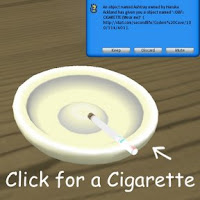
  • Ashtray
  • Magazine × 2 and Book

Suclpted Sofa - TYPE G, H and I Leather (Color Changeable)
Please refer to this entry.
Leather Sofa Set (Color Changeable)

Couch - TYPE B
- 1-seater
- Prims: 3
- Permissions: mod / trans / NO copy


Couch - TYPE C
- 1-seater
- Prims: 4
- Permissions: mod / trans / NO copy


Low Table / Side Table
- Prims: 4 each
- Permissions: trans / mod / NO copy

Cube Lamp / Pushpin Lamp
- Illumination color change
- Prims: 2 each
- Permissions: trans / NO mod / NO copy


Touch a shade to open dialog menu.
You can choose from 11 illumination colors and turn off a light.


Ashtray
- Prims: 2
- Permissions: trans / NO mod / NO copy


Touch for a cigarette with smoking animation and to stop smoke from Ashtray.
You smoke every 25 seconds while you are wearing.


How to Change Color
- Sofas (TYPE G, H and I)
Please refer to this entry.
Leather Sofa Set (Color Changeable)

- Couches / Tables
These are modifiable. That mean you can change color from the edit window without typing any command.

Easy Instruction for a non-builder
1. Right click the object. (furniture)
2. Choose "Edit" from a pie menu.
3. Check "Edit linked Parts" box in the edit window.
4. Click the part of an object which you want to change color. ( [shift + click] to select multiple parts)
5. Click "Color" box in "Texture" tab to open a color palette window.

Excuse my poor poor English. X(


You can lay out furnitures and colors freely.


This Product is in a temp-rezzing vendor at my store.
Now you can buy my products at Coders Cove in Second Life.
slurl: http://slurl.com/secondlife/Coders Cove/90/89/24/

Senin, 21 April 2008

Old Wood Living Room Set - ver.2.0

Old Wood Living Room Set - ver.2.0
- Contents: 2 sofas + Tall Lamp + Table + Retro TV (and a Texture for Screen) + TV Rack
- Prims: 24 (5+5+2+7+2+3)
- Permissions: trans / no copy / no mod


Old Wooden Sofa S - TYPE A
has 2-seater.

- Click Position to Sit -
1. Seat ( has 2 Poses)
2. Armrest

- How to Change Pose -
You can change pose with Page Up or Down key on your keyboard.
When someone (except the owner of the sofa) sit on, it will send a message like this " Use PageUp or Down key to change pose. ".

Old Wooden Sofa L - TYPE B
has 4 seater.

- Click Position to Sit -
1. Seat
2. Armrest (whichever side)
3. Backrest
4. Wooden bottom under a seat

Old Wood Table
has 1 Seater.

Wooden Tall Lamp
Click a shade and open dialog menu.You can choose illumination color from 8 colors and turn off a light.

Retro TV
You can use the "Retro TV" as a land media display.

- How to Set a Land Media for "Retro TV" -
1. Open "About Land" window. (World > About Land...)
2. Drag "tv screen" texture from inventory and drop into "Replace Texture:" window on Media tab.
3. Click "Retro TV" to start (stop) a media content which you choose.


Now you can buy my products at Coders Cove in Second Life.
slurl: http://slurl.com/secondlife/Coders%20Cove/90/89/24/

Senin, 11 Februari 2008

Old Wood Living Room Set

New virsion 2.0 is available now. Please refer to the new post.

Old Wood Living Room Set
- Contents: Single Sofa + Long Sofa + Tall Lamp + Table
- Prims: 19 (5+5+2+7)
- Permissions: trans / no copy / no mod

*For your reference, this set is sold loose at my main store. However, when you compare the price, obviously, this set is a better deal than loose stuff.


Old Wooden Single Sofa has 2 poses.
You can change pose with Page Up or Down key on your keyboard.


Old Wooden Long Sofa has 3 + 1 seater.
Click Position to sit is...

Seat


Armrest (Whichever side)


Backrest


Bottom (not a seat)
It might be hard to click a lil bit. :(


Wooden Tall Lamp
Click a shade to open dialog menu.
You can choose from 8 illumination colors and turn off a light.


Old Wood Table has 1 seater.


Now you can buy my products at Coders Cove in Second Life.
slurl: http://slurl.com/secondlife/Coders%20Cove/90/89/24/